 跳至主要內容
春水堂》環球中和店,單店限定上市●黑糖琥珀珍珠霜淇淋●【2023/4/30止】
【活動期間以春水堂最後公告為主】

「選一處透著暖陽的位置,
點綴琥珀色的午茶時光。」
#環球中和店12/1單店限定上市
●⦈#黑糖琥珀珍珠霜淇淋⦇●
紅茶霜淇淋與黑糖交織,
濃郁香氣於唇間瀰漫,
搭配Q彈珍珠與酥脆焦糖脆餅,
是最能滿足視覺與味蕾的甜蜜組合ღ
┌限定販售至2023/04/30唷~
#期間限定就像霜淇淋
#要在融化前趕緊品嚐
======
圖片及資料來源:春水堂Chun Shui Tang
======
春水堂Chun Shui Tang 優惠卷、折價券、優惠內容《前往春水堂官網》《春水堂臉書》※春水堂Chun Shui Tang 保有隨時調整活動期間、各項優惠內容及終止活動之權利 ※
- WordPress.org blog: WordPress 7.2 Beta 1 is ready for download and testing!
 by David Baumwald on 2026-10-20 at 16:02:09
This beta release is intended for testing and development only. Please do not install, run, or test this version of WordPress on production or mission-critical websites. Instead, use a test environment or local site to explore the new features. How to Test WordPress 7.2 Beta 1 You can test WordPress 7.2 Beta 1 in any of the following ways: WordPress Beta Tester PluginInstall and activate the WordPress Beta Tester plugin on a WordPress install. Select the “Bleeding edge” channel and “Beta/RC Only” stream.Direct DownloadDownload the Beta 1 version (zip) and install it on a WordPress website.Command Line (WP-CLI)Use this WP-CLI command: wp core update –version=7.2-beta1WordPress PlaygroundUse a 7.2 Beta 1 WordPress Playground instance to test the software directly in your browser. No setup required-just click and go! The scheduled final release date for WordPress 7.2 is December 8, 2026. The full release schedule can be found here. Your help testing Beta and RC versions is vital to making this release as stable and powerful as possible. Thank you to everyone who contributes by testing! Editing Experience Responsive Design Controls Building on the responsive design improvements introduced in WordPress 7.1, WordPress 7.2 expands viewport-specific styling to additional design tools and blocks. Creators gain more granular control over how layouts and visual settings adapt across screen sizes, including responsive Gallery settings for columns, image cropping, and aspect ratios. Learn more: GitHub #80388, #82003 Improved Global Styles and Design Tools WordPress 7.2 makes site-wide styling easier to manage with a new Customized filter for finding blocks with modified styles and inherited Global Styles values displayed directly in block inspector controls. Expanded design tools and support for styling form elements provide additional flexibility when creating a consistent visual identity across a site. Learn more: GitHub #82520, #76525, #34198, #84657 Text Shadow Support WordPress 7.2 introduces new text shadow controls, giving creators more ways to add depth and emphasis to their content. Text shadows can be customized through block settings and defined as presets in theme.json, making it easier to maintain consistent typography across a site. Learn more: GitHub #73320, GitHub #79584, Trac #65869 Easier Navigation Management Improvements to the Site Editor make managing navigation links more intuitive. Creators can add, organize, and edit navigation items directly from the editor sidebar, making it easier to maintain site menus without interrupting their editing workflow. Learn more: GitHub #77069 Better Collaboration with Notes WordPress 7.2 introduces Emoji reactions on notes and a new toolbar icon that makes Notes easier to access and manage. Notes move to the editor canvas, bringing conversations directly into the margin. Users can now keep Notes and the block settings sidebar open simultaneously, making it easier to review feedback while editing content. A new minimized Notes mode reduces visual clutter, while improvements to positioning and display create a smoother, more consistent collaboration experience. Learn more: GitHub #79970, GitHub #83786, GitHub #80015, Trac #64638 Faster, More Efficient Media Uploads WordPress 7.2 expands client-side media processing to the Media Library, allowing images to be resized, compressed, and converted directly in the browser before being uploaded. This can improve upload performance, reduce server resource usage, and provide better support for modern image formats, particularly on hosting environments with limited image-processing capabilities. Learn more: Trac #65661, GitHub #12585 New “On This Day” Dashboard Widget WordPress 7.2 introduces a new On This Day dashboard widget that helps users rediscover content published on the same date in previous years. By highlighting posts from the site’s history, the widget makes it easier to revisit past content, celebrate milestones, and find opportunities to refresh or reshare older posts. Learn more: Trac #65116 Block Editor Usability Improvements WordPress 7.2 includes a collection of smaller improvements aimed at reducing friction in everyday editing. These changes include clearer error messages, more helpful feedback when something goes wrong, and refinements to common editor interactions, making the editing experience more predictable and approachable. Learn more: GitHub #81453, #82496, #84656, #84649 A More Consistent WordPress Admin WordPress 7.2 continues modernizing the administration experience by replacing legacy Dashicons in the admin bar and sidebar with icons from the WordPress icon library. The updated icons bring greater visual consistency between the traditional WordPress dashboard and newer editing interfaces. Learn more: GitHub #12270 An Updated Block Settings Experience A new DataForm-powered inspector introduces a refreshed approach to managing block settings in the editor. Built on the DataForm component system, this work aims to provide more consistent controls and a more extensible foundation for future block editing improvements. Learn more: GitHub Gutenberg · Call for Testing Faster WordPress Administration WordPress 7.2 improves admin performance by modernizing how scripts and stylesheets are loaded. Instead of combining assets into large files, WordPress now loads them individually for better browser caching. A new prefetching mechanism also anticipates which admin screen users are likely to visit next, loading its resources in advance to make navigation between the dashboard, post lists, and editor faster. Learn more: Trac #57548 For Developers New Secrets API WordPress 7.2 introduces a Secrets API, providing developers with a standardized, secure way to store sensitive credentials such as API keys and authentication tokens. The API supports encryption at rest, credential rotation, and customizable storage providers, helping plugins and integrations manage sensitive information more securely. Learn more (Trac #66187) Random Content Redirects WordPress 7.2 adds support for random content redirects, allowing visitors to discover a randomly selected post through a dedicated URL. This provides a simple way to encourage content exploration and help readers rediscover older posts. Learn more: Trac #64498 More Powerful APIs for Developers WordPress 7.2 expands the Abilities API with new capabilities for accessing and querying WordPress data, providing a more consistent foundation for integrations, automation, and AI-powered tools. (Trac #66268, #64605, #64657) Enhancements to the Interactivity API introduce new ways to render trusted HTML and manage reactive navigation, giving developers more flexibility when building dynamic, interactive blocks. (Trac #66246, Gutenberg PR #83092) Additional improvements to the HTML API, block supports, and responsive design tools provide more reliable markup processing and greater control over how custom blocks are styled and displayed across devices. (Trac #65824, #66150, #65869) How important is your testing? Testing for issues is a critical part of developing any software, and it’s a meaningful way for anyone to contribute – whether or not you have experience. Details on what to test in WordPress 7.2 are available here. If you encounter an issue, please share it in the Alpha/Beta area of the support forums. If you are comfortable submitting a reproducible bug report, you can do so via WordPress Trac. You can also check your issue against this list of known bugs. Curious about testing releases in general and how to get started? Follow along with the testing initiatives in Make Core and join the #core-test channel on Making WordPress Slack. WordPress 7.2 will include new features that were previously only available in the Gutenberg plugin. Learn more about Gutenberg updates since WordPress 7.1 in the What’s New in Gutenberg posts for versions 23.7, 23.8, 23.9, 24.0, 24.1, 24.2, and 24.3. What’s new in WordPress 7.2? With so much in progress for WordPress 7.2 Beta 1, this is still only the beginning; expect continued refinement with each Beta and RC release ahead of the final release on December 8, 2026 Just for you: a Beta 1 haiku: Ipsum takes the stageSecrets bloom, designs take shapeNew blocks come alive Props to @audrasjb, @annezazu, @adamsilverstein, @westonruter, @markoserb, @im3dabasia1, @jorbin, and @noruzzaman for proofreading and review.
- Open Channels FM: Community Without the Noise, Revisitedby Bob Dunn on 2026-10-20 at 13:46:20
A commentary on building meaningful online communities that prioritize value and listening over constant activity.
- OpenStation Blog: OpenStation: turn wp-admin into a desktop, and try it in 30 secondsby Daniel López on 2026-10-20 at 13:44:50
OpenStation is a free WordPress plugin that turns wp-admin into a desktop. Every admin screen opens in its own window that you can move, resize and keep open next to the others. You can try it in your browser right now, with nothing to install. Can’t see the video? Watch it on YouTube. Why we built it Most of us spend the day jumping between screens in wp-admin. You open a post, go back to the list, check the media library, then go back again. With OpenStation, those screens stay open side by side, so you don’t lose your place. What you get A window for every admin page: posts, media, settings, plugins A dock with your whole admin menu, including your other plugins Several desktops, for example one for writing and one for site settings Wallpapers, widgets and accent colors Cmd+K to jump anywhere fast Your windows are still open when you come back Try it in your browser Go to the OpenStation page on WordPress.org and click Live Preview. It runs a full WordPress site with OpenStation in your browser tab, so you can’t break anything. Install it on your site In your admin, go to Plugins → Add New and search for “OpenStation” Click Install Now, then Activate Click the desktop icon in the top-right corner of the admin bar It’s safe to try OpenStation is opt-in for each user, so the rest of your team keeps the normal admin. Click the same icon to go back to the classic view. If you deactivate the plugin, wp-admin goes back to exactly how it was. It doesn’t change WordPress core. Tell us what you think Have a question? Ask in the support forum. Found a bug or have an idea? Open an issue on GitHub.
- Open Channels FM: More Code, More Problems? What AI-Generated Software Means for Usby Open Channels FM on 2026-10-20 at 10:01:00
AI tools have simplified app creation, enabling rapid prototyping. However, the challenge now lies in discerning which ideas are genuinely valuable to users. As anyone can create apps quickly, the focus should shift from mere production to understanding user needs and ensuring the apps solve real problems to avoid mediocrity.
- Donncha: Travel Steps is a travel journal
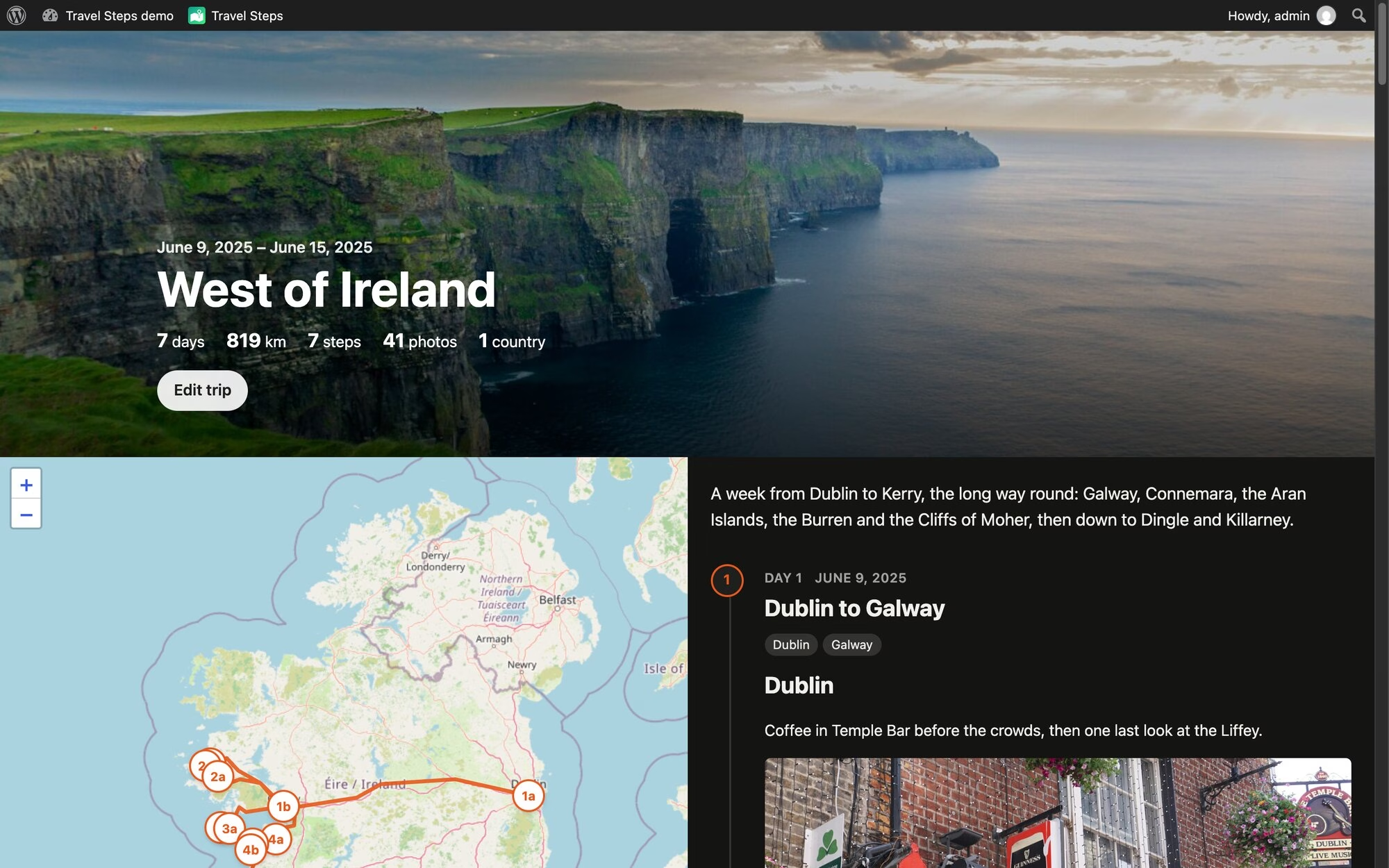 by Donncha on 2026-10-19 at 14:15:48
I made a WordPress plugin for my holidays. It’s called Travel Steps, and it turns a trip into a page with a map down one side and the story of each day down the other. Every photo I take ends up in Immich, on my own server. My phone sends where I’ve been to Dawarich, on the same server. So after a trip I have all the photos and the whole route, sitting in two apps on my private server. The travel apps that make nice trip pages want your photos and your location on their servers. I’d rather keep them on mine. How it works You make a trip, give it a first and last day, and press Sync. Travel Steps asks Dawarich for your location over those days, and Immich for the photos you took. You can pick one Immich album instead. If you don’t use Immich at all, upload the photos to the trip. It will detect the start and end dates from the uploaded photos, or an Immich album too. One sync, and a step for each day. Sync makes a draft post for every day that has favourite photos. Each one is a “step”. It splits the day into places too. A new place starts when a favourite is more than 2 km from the last one and in a different town. Each place gets a heading and a block of photos, so all that’s left is the writing. Each day is a post you write in the block editor. The photos under each heading come straight from Immich. Place names come from GeoNames data that ships with the plugin, so naming a town doesn’t send your location anywhere. Immich only names a place from a photo’s own GPS. A photo from a camera without GPS gets placed from your Dawarich history instead, and named the same way. Publish the days you want people to see. Drafts stay private, and so do their photos. The map follows you as you scroll. Get to day 3 and day 3’s markers light up. The distance at the top follows the whole route, flights included. GPS glitches that put you in the Atlantic for a second are dropped. Anything you’d have needed to travel faster than 1,080 km/h to reach counts as a glitch. Sorry, Concorde. Your photos stay at home Visitors never talk to Immich. WordPress fetches each photo, caches it and serves it itself, so Immich and the original files stay private. It caches a trip’s photos in the background after a sync. The trip keeps working when Immich is down. A daily sweep deletes cached photos older than a number of days you choose, whether a trip still uses them or not, and they’re fetched again the next time someone looks. Photos you upload to a trip keep their GPS in the original, but it’s stripped from every copy WordPress makes, and only those copies are ever sent. A trip can have a password, and you can let some logged-in people skip it. Pin, hide, cover Hover over a photo to pin it (always show it), hide it, or make it the trip’s cover. The rest of the day’s photos sit behind a “Show more photos” link. On phones, those buttons show up after you press Edit photos as illustrated by the images below. Tap a photo and it opens full screen. On a phone you swipe from one photo to the next, edge to edge. On a desktop there are arrows, and the arrow keys work too. Try it Here’s a demo in WordPress Playground. It’s a week in the west of Ireland, running in your browser that installs nothing. Stand-in Immich and Dawarich servers feed the real sync code with photos from Unsplash. You’re logged in as an admin, so press Sync, pin and hide photos, and edit the days in the block editor. It all disappears when you close the tab. The code is on GitHub. To install it, download travel-steps.zip from the latest release and upload it under Plugins → Add New. It needs WordPress 6.7 and PHP 8.0. Immich and Dawarich are both optional. It has been submitted to WordPress.org but if you read this blog, you’ll know how to install a plugin from a zip file! WpApp Travel Steps is built on WpApp, Alex Kirk’s framework for building apps on top of WordPress. A plugin usually adds screens to wp-admin, or puts its pages inside your theme and hopes the CSS gets along. A WpApp app gets its own URLs instead (/travel-steps/ here), and its pages are plain HTML with no theme in the way. WordPress still does the boring work: users and logins, roles, the block editor, the REST API, cron and the database. WpApp adds the bits in between: URL routing, using WordPress rewrite rules, pages that don’t load your theme, the admin bar on every page, with the app’s own icon (the green map at the top of my screenshots), access control using WordPress capabilities. You can start one with composer create-project akirk/create-wp-app my-app. Alex has a showcase of apps built with it, including a cookbook and a family wiki. Built with Claude Code I wrote Travel Steps with Claude Code. The first commit was on 11 October, and there are many more now. Most of the work went round the same loop. I file an issue, Claude fixes it test-first on a branch and opens a pull request, and other agents review it. I deploy it to my own server and try it. The tests run in WordPress Playground too, the same as the demo. If you run Immich, give it a whirl. Bug reports welcome on GitHub Demo photos from Unsplash: Cliffs of Moher by Jarek Skowron, Temple Bar by Sarah, Galway by Daniel Zbroja and Anna Hunko, Kilronan by Jonathan Borba. Map © OpenStreetMap contributors. #TravelSteps #WordPress #WordPressplugin


